See complex work, clearly.
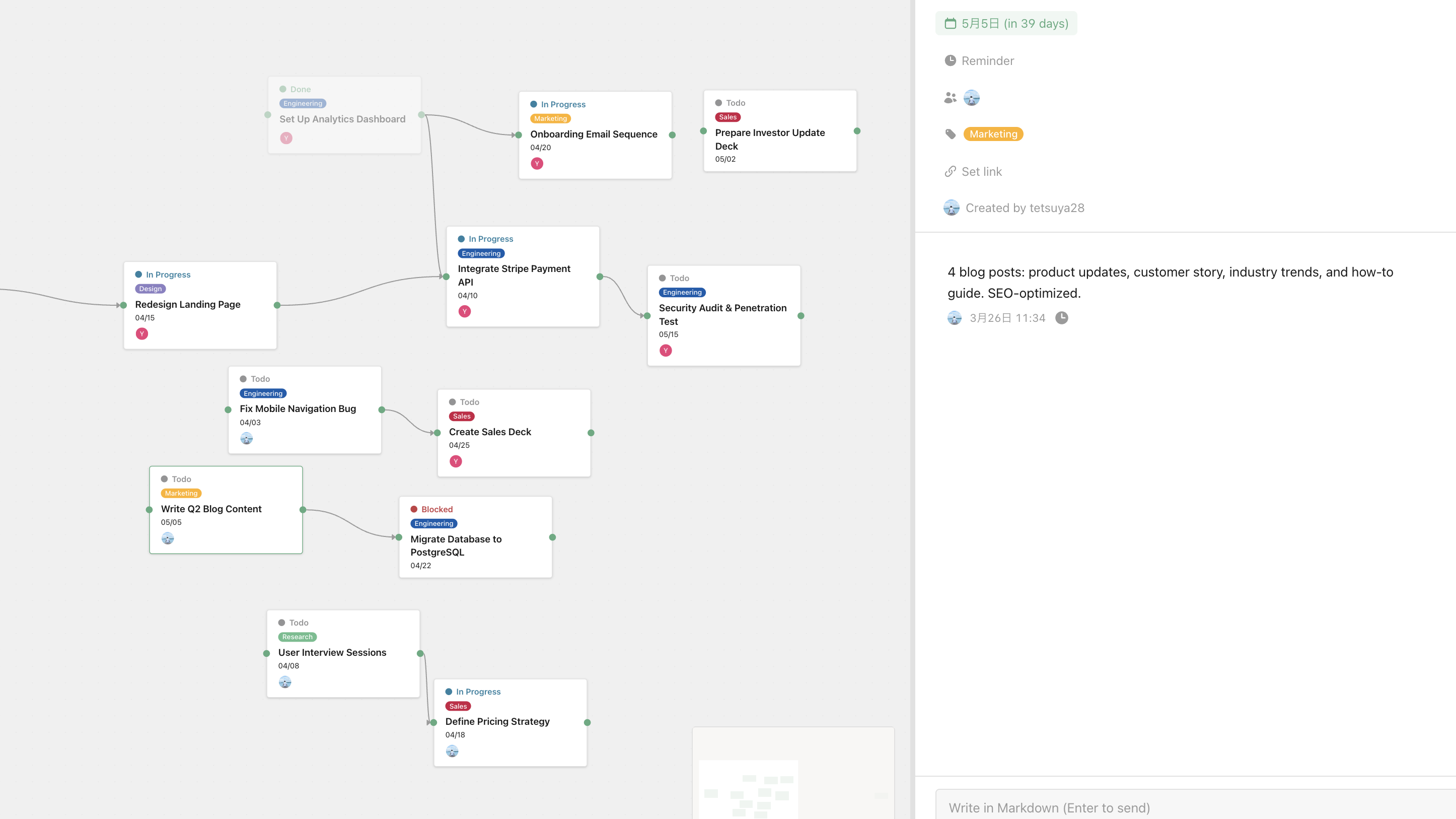
Visualize the whole picture of work that lists can't express, on a canvas you arrange freely. Connect dependencies with lines, group related tasks together, and structure work exactly the way you think.
Three pillars that move work forward.
Layout that reflects your thinking
Order and hierarchy are up to you. Group by project phase, arrange chronologically, or place by priority — the canvas bends to the shape of your thought.
Draw dependencies, not just checklists
Connect tasks with arrows and instantly see what's waiting on what, and where the bottleneck is. Operate on the structure of work itself, not just the next action.
Zoom out for overview, zoom in for detail
Pull back for the project shape. Move in for individual task detail. Infinite canvas with mouse-wheel zoom and drag-to-pan.
Great for work like this.
Parallel project overview
For engineers juggling multiple products in parallel — see the whole picture on one screen.
Investigating complex bugs
Lay out reproduction steps, root cause hypotheses, and related issues visually — leaving a trail of your thinking.
Sprint planning
Arrange tasks while making dependencies and risks visible, then decide priorities with confidence.